
Common SEO Mistakes That Kill Your Rankings
Imagine spending months writing articles, building links, and designing your website, only to wake up one morning and see your organic traffic drop to zero. It is a nightmare for every business owner. Many times, this drop does not happen because your competitors are better than you. It happens because of silent errors hidden inside your website. In this complete guide, Bizzdose Media and Marketing breaks down the common SEO mistakes that kill your rankings and gives you easy, practical ways to fix them.
The SEO landscape has changed completely. Search engines like Google, Bing, and AI platforms like ChatGPT, Gemini, and Perplexity no longer look at keywords alone. They look for deep value, real human experience, and perfect technical health. If your site still uses old tricks from five years ago, you are actively pushing your target audience into the arms of your competitors.
Let us dive deep into the exact errors holding your website back and see how you can rebuild your search engine visibility from scratch.
Why Is Your Website Losing Organic Traffic?
Before we fix the problems, we must understand why search engines penalize or drop certain websites. Google uses a complex set of systems known as the Helpful Content System. This system is built to reward websites that show high E-E-A-T (Experience, Expertise, Authoritativeness, and Trustworthiness).
If your website contains technical issues, poor writing, or bad user experiences, search engines notice it immediately. Users leave your page quickly, your bounce rate goes up, and your click-through rate drops. When these metrics fall, your rankings fall with them. If you do not track these changes, you will fall victim to the common SEO mistakes that kill your rankings.
Quick Comparison: Healthy SEO vs. Unhealthy SEO
| Feature | Healthy SEO (High Rankings) | Unhealthy SEO (Ranking Drops) |
| Content Focus | Answers user questions deeply with real experience | Written just for search engines using repetitive words |
| User Experience | Loads in under 2 seconds, perfect on mobile phones | Slow loading, broken images, hard to read on mobile |
| Link Building | Earned links from trusted, real websites | Bought cheap links from spammy link farms |
| Technical Health | Clean sitemap, no broken links, zero crawl errors | Indexing broken pages, duplicate content, bad redirects |
Key Takeaway: Search engines want to satisfy their users. If your website helps users solve their problems quickly, your rankings will climb. If your website frustrates users, your rankings will drop.
Mistake 1: Ignoring User Search Intent
What is search intent? Search intent is the primary reason why a user types a specific phrase into a search engine. If someone searches for “how to fix a leaky pipe,” they want a step-by-step tutorial, not a product page selling plumbing tools.
One of the most common SEO mistakes that kill your rankings is creating the wrong type of content for your target keywords. If you try to rank a sales page for an informational search phrase, you will fail.
The 4 Main Types of Search Intent
- Informational: The user wants to learn something (e.g., “What is digital marketing?”).
- Navigational: The user wants to find a specific website (e.g., “Bizzdose Media and Marketing login”).
- Commercial: The user wants to research options before buying (e.g., “Best local marketing agencies 2026”).
- Transactional: The user is ready to buy right now (e.g., “Hire SEO expert online”).
How to Fix It
- Analyze the SERP: Before writing anything, type your target keyword into Google. Look at the top 5 results. Are they blogs, product pages, or videos? Match that format.
- Update Old Content: If an old blog post lost its ranking, check if the search intent changed. Rewrite it to answer the current questions users are asking.
Image 1 Suggestions
- Placement: Right below the Search Intent section.
- Prompt: A clean infographic chart showing the 4 types of search intent (Informational, Navigational, Commercial, Transactional) with simple icons for each.
- File Name: four-types-of-seo-search-intent.webp
- Alt Text: An infographic illustrating informational, navigational, commercial, and transactional search intent types.
Mistake 2: Keyword Stuffing and Topic Overlap
Many years ago, you could rank a page by repeating your main keyword fifty times in a short article. Today, doing this will get your website penalized instantly. Keyword stuffing makes your content unreadable for humans and looks highly suspicious to modern AI search engines.
Another major issue is keyword cannibalization. This happens when you write multiple articles about the exact same topic. When you do this, your own pages compete against each other, confusing search engines and diluting your ranking power. This is why keyword stuffing and topic overlap are considered common SEO mistakes that kill your rankings.
[Bad Example of Keyword Stuffing]:
"We offer the best SEO services. Our SEO services are affordable. If you need SEO services, contact our SEO services company today for the best SEO services near me."
Best Practices for Keyword Placement
- Keep your primary keyword density under 1% to 1.5%.
- Place your primary keyword naturally in the H1 title, the first 100 words, one H2 heading, and the meta description.
- Use LSI (Latent Semantic Indexing) keywords and synonyms instead of repeating the same word. For example, use “search visibility,” “organic traffic,” and “website optimization” alongside “SEO.”
Expert Insight: “Modern search engines use Natural Language Processing (NLP) to understand context. They do not count words; they analyze concepts and entities. Write for the human reader first, and the search engine will understand.” — Bizzdose SEO Team
Mistake 3: Neglecting Mobile Users and Site Speed
More than 60% of global web traffic comes from mobile devices. Google uses mobile-first indexing, meaning it looks at the mobile version of your website to decide your search rankings. If your site looks beautiful on a desktop computer but breaks on a smartphone, you are committing one of the major common SEO mistakes that kill your rankings.
Slow page speed is another silent killer. If your website takes more than 3 seconds to load, over 40% of visitors will hit the back button. This quick exit tells Google that your site is bad, causing your rankings to plunge.
[Site Speed Impact on Bounce Rate]
1s to 3s load time: Bounce rate increases by 32%
1s to 5s load time: Bounce rate increases by 90%
1s to 10s load time: Bounce rate increases by 123%
Step-by-Step: How to Speed Up Your Website
- Compress Images: Large image files slow down pages. Use modern WebP formats instead of heavy JPEGs.
- Use a CDN: A Content Delivery Network stores copies of your site on servers across the world, delivering it faster to local users.
- Remove Unused Plugins: If you use WordPress, deactivate and delete any plugins you do not need.
- Fix Core Web Vitals: Focus on LCP (Largest Contentful Paint), INP (Interaction to Next Paint), and CLS (Cumulative Layout Shift) inside your Google Search Console.
Image 2 Suggestions
- Placement: Inside the Mobile Optimization and Site Speed section.
- Prompt: A split screen comparison illustration. On the left, a fast-loading website on a smartphone with a green checkmark. On the right, a slow-loading website with a loading spinner and a red warning cross.
- File Name: website-speed-mobile-optimization-comparison.webp
- Alt Text: A visual comparison showing a mobile-optimized fast website versus a slow website.
Mistake 4: Publishing Thin, Low-Quality, or Purely AI Content
With the rise of generative AI tools, it has become incredibly easy to generate thousands of blog posts with a single click. However, mass-producing low-quality AI content is one of the quickest common SEO mistakes that kill your rankings.
Search engines can easily detect generic, repetitive content that adds no unique value to the internet. If your article looks exactly like every other page on the web, why should Google rank it?
How to Inject Real E-E-A-T Into Your Content
- Share Personal Experience: Use phrases like “In our experience at Bizzdose Media and Marketing,” or “When working on a recent client project, we noticed that…”
- Add Original Data: Conduct simple surveys, share screenshots of your own results, or create unique case studies.
- Quote Industry Experts: Interview professional specialists and add their direct quotes to your articles.
- Keep It Actionable: Do not just explain what a problem is. Give your readers clear, step-by-step instructions on how to fix it.
Pros and Cons of Using AI for Content Creation
| Pros of AI Content Tools | Cons of AI Content Tools |
| Helps brainstorm outline ideas quickly | Generates generic, repetitive sentences |
| Speeds up research processes | Lacks real-world human experience and emotion |
| Fixes basic grammar and spelling errors | Can repeat outdated or incorrect facts |
Mistake 5: Poor Internal Linking and Broken Links
Think of your website as a city, and internal links as the roads connecting the buildings. If there are no roads, people (and search engine crawlers) cannot explore the city.
Poor internal linking structure keeps search engines from finding and indexing your new content. Similarly, having broken links (404 errors) creates dead ends that frustrate users and waste your crawl budget. This neglect forms part of the common SEO mistakes that kill your rankings.
[Healthy Internal Link Structure Example]
Homepage
   ├── Category Page: Digital Marketing
   │     ├── Blog Post: Social Media Tips
   │     └── Blog Post: SEO Strategies (Links back to Digital Marketing)
   └── Category Page: Web Design
Best Practices for Internal Links
- Use descriptive anchor text. Instead of writing “click here,” write “read our full technical SEO guide.”
- Link from your high-authority, top-performing pages to your new or lower-ranking blog posts.
- Regularly scan your website using free tools like Broken Link Checker to find and fix dead links immediately.
Image 3 Suggestions
- Placement: Next to the Internal Linking section.
- Prompt: A clean node diagram or flowchart showing a healthy internal linking structure connecting a homepage to category pages and individual blog articles.
- File Name: website-internal-linking-structure-diagram.webp
- Alt Text: A visual diagram showing how to structure internal links between web pages for better SEO.
Mistake 6: Bad Local SEO Strategies for Local Businesses
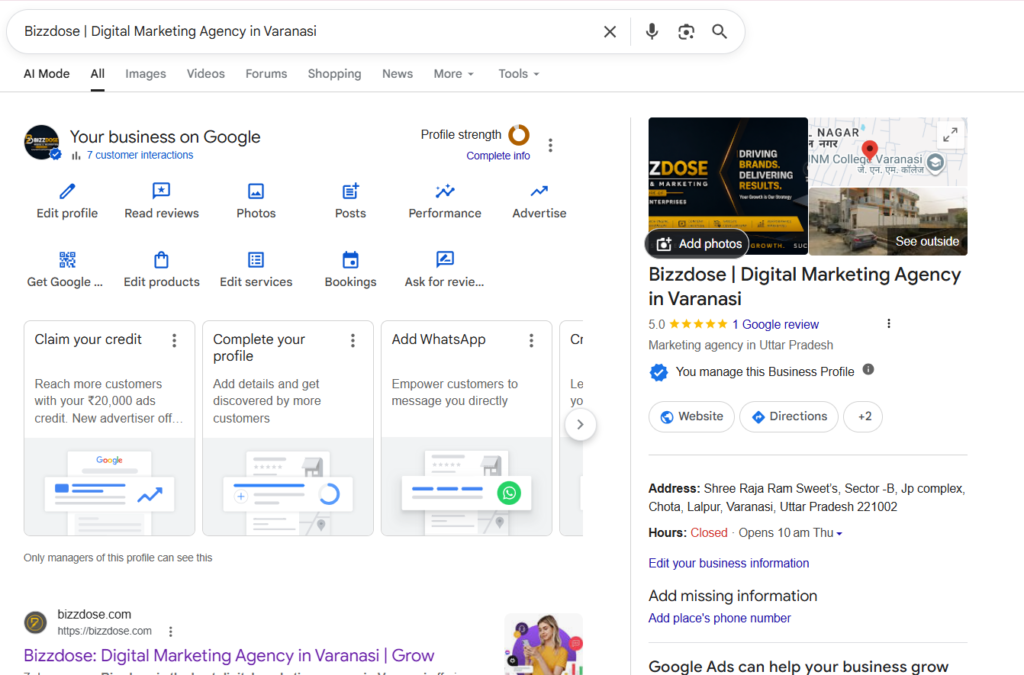
If you run a local brick-and-mortar business, your digital survival depends entirely on Local SEO. Many local businesses set up their Google Business Profile and then forget about it completely. Failing to optimize for local searches is among the most damaging common SEO mistakes that kill your rankings.
Why Local Businesses Need a Dedicated Local Image Strategy
To stand out in local search and Google Maps, you must upload high-quality local business images regularly. For example, photos of your office storefront, your team working on-site, or your completed projects add massive trust signals.
To get the absolute best results, you need to use the best descriptive headings for your local images and update them often. This helps Google connect your business entity to a physical geographic location, lifting your visibility in the local map pack.
Critical Local SEO Mistakes to Avoid
- Inconsistent NAP Data: Your Name, Address, and Phone number must be exactly identical across your website, social media, and local directories.
- Ignoring Customer Reviews: Not replying to reviews—both positive and negative—signals to search engines that your business is inactive.
- Missing Local Keywords: Ensure your landing pages explicitly mention your city and neighborhood names (e.g., “SEO Agency in Lucknow”).
Image 4 Suggestions
- Placement: Inside the Local SEO section.
- Prompt: A realistic photo of a modern local business storefront with a glowing Google Maps pin icon hovering over the entrance. Professional, clean appearance.
- File Name: optimized-local-business-storefront-seo.webp
- Alt Text: A well-optimized local business storefront showing strong local SEO map presence.
Mistake 7: Ignoring Google Search Console and Technical Errors
Google Search Console (GSC) is a free communication tool between your website and Google. It tells you exactly which pages are indexed, which ones have errors, and what keywords are driving traffic to your site.
Ignoring your GSC dashboard is one of the most dangerous common SEO mistakes that kill your rankings. If you do not look at your coverage reports, you might completely miss major indexing issues, server drops, or manual penalties.
3 Technical Red Flags You Must Fix Today
- Wrong Noindex Tags: Sometimes web developers accidentally leave a
noindextag active after launching a page. This tells Google never to show that page in search results. - Sitemap Errors: If your XML sitemap is broken or outdated, search engine crawlers cannot discover your new content efficiently.
- Robots.txt Blockers: A single wrong line of code in your
robots.txtfile can accidentally block search bots from crawling your entire website.
Key Takeaway: Check your Google Search Console at least once a week. Fix any red error flags under the “Indexing” or “Core Web Vitals” tabs immediately to safeguard your organic visibility.
Image 5 Suggestions
- Placement: Below the Technical Errors section.
- Prompt: A close-up view of a technical web developer’s screen showing clean code with green checkmarks alongside an open Google Search Console index status report.
- File Name: google-search-console-technical-seo-errors.webp
- Alt Text: A close-up view of code optimization and fixing indexing bugs inside Google Search Console.
Mistake 8: Building Toxic, Low-Quality Backlinks
Backlinks are like votes of confidence from other websites. But not all votes are equal. Getting a backlink from an authoritative news site or an established industry blog tells Google your site is highly trustworthy.
On the flip side, buying 5,000 cheap links on Fiverr from spammy link farms is one of those classic common SEO mistakes that kill your rankings. Google’s modern AI algorithms are extremely smart at identifying unnatural backlink patterns. If your site suddenly gains hundreds of low-quality links from unrelated foreign sites, you risk receiving an algorithmic or manual penalty.
How to Build High-Quality, Safe Backlinks
- The Skyscraper Technique: Find an excellent piece of content in your niche, create a version that is ten times more detailed and useful, and reach out to websites linking to the original piece to suggest yours instead.
- Guest Blogging on Real Sites: Write high-quality educational posts for respected websites in your industry that feature active communities.
- Create Linkable Assets: Publish comprehensive data reports, unique infographics, or free online calculators that other bloggers will naturally want to reference and link back to.
Image 6 Suggestions
- Placement: Right after the Backlink Strategy section.
- Prompt: An abstract conceptual digital artwork showing strong, glowing golden chains connecting a small website icon to a massive, highly trusted digital authority tower.
- File Name: high-quality-backlinks-seo-authority.webp
- Alt Text: An abstract visual showing safe, high-quality authoritative backlink connections boosting a website’s SEO.
How to Recover from a Sudden Ranking Drop (Step-by-Step)
If your website has already experienced a drop in organic traffic, do not panic. Follow this step-by-step recovery process designed by Bizzdose Media and Marketing to find the root cause and repair your rankings.
Step 1: Rule Out Technical Issues
Check Google Search Console for any sudden indexing errors, security issues, or manual actions. Make sure your server did not experience downtime during Google’s crawl cycles.
Step 2: Check for Recent Search Algorithm Updates
Search engine platforms constantly update their ranking systems. Look at trusted industry news sites like Search Engine Land or Search Engine Journal to see if a core algorithm update rolled out at the same time your traffic dropped.
Step 3: Analyze Your Top Lost Pages
Identify exactly which pages lost the most traffic. Did they fall from position 2 to position 8, or did they disappear from search results completely? Look closely at the pages that replaced yours to see what they are doing better.
Step 4: Fix Thin and Outdated Content
Review your underperforming content. Add new sections, update outdated facts, fix broken links, improve your font readability, and ensure you are meeting user search intent perfectly.
Image 7 Suggestions
- Placement: Inside the Step-by-Step Recovery section.
- Prompt: A professional workflow diagram showing steps: 1. Check Technical Issues, 2. Review Algorithm Updates, 3. Analyze Competitors, 4. Update and Refresh Content. Minimalist clean style.
- File Name: seo-ranking-drop-recovery-workflow.webp
- Alt Text: A workflow diagram outlining the step-by-step process to recover from an organic ranking drop.
The Ultimate SEO Clean-Up Checklist
Use this quick checklist to scan your website for the common SEO mistakes that kill your rankings and fix them before they harm your performance.
- [ ] URL Optimization: Every URL on your site is short, clean, and includes the main target keyword.
- [ ] Mobile Responsive: Your website menu, pop-ups, tables, and images work smoothly on all mobile screens.
- [ ] Page Speed Check: Your homepage and top landing pages load in under 2 seconds on mobile connections.
- [ ] No Keyword Stuffing: All target keywords fit naturally into the text without feeling forced or repetitive.
- [ ] Fixed 404 Errors: All broken links are either fixed or redirected to highly relevant live pages using clean 301 redirects.
- [ ] Schema Markup: Relevant schema markup (Article, LocalBusiness, FAQ, or Product) is correctly added to your pages.
- [ ] Google Business Profile: Your local business listing is fully verified, contains the best headings, and features recent local photos.
Image 8 Suggestions
- Placement: Next to the Ultimate SEO Checklist.
- Prompt: A stylized, realistic clip-board with a checklist showing green checkmarks next to clean text points like “Speed Fixed,” “Content Updated,” and “No Broken Links.”
- File Name: ultimate-seo-audit-clean-up-checklist.webp
- Alt Text: A checklist illustration representing a complete technical and on-page SEO cleanup.
Frequently Asked Questions (FAQs)
What is the single biggest SEO mistake that drops rankings?
The biggest mistake is ignoring user search intent and user experience. If your content does not directly, quickly, and cleanly answer the specific question a user has, search engines will lower your rankings in favor of pages that do.
Why is my website traffic dropping despite regular blog posts?
If you write new content regularly but your traffic continues to decline, you might be trapped by common SEO mistakes that kill your rankings. This often points to keyword cannibalization, publishing thin or generic AI content without unique insights, or ignoring underlying technical crawl errors.
How many times should I use my main keyword in an article?
There is no magic number. Use your main keyword naturally where it makes sense, such as in your H1 title, your first paragraph, and a few subheadings. Avoid stuffing keywords, as modern semantic search engines look closely at contextual language rather than simple repetition.
Can bad backlinks completely destroy my search rankings?
Yes. If your link profile becomes flooded with spammy, low-quality links from link networks, search engines may flag your site for manipulation. Focus strictly on earning natural links from relevant, trusted websites in your industry.
How often should I check my website for broken links?
It is a great practice to check your entire site for broken links at least once a month. Broken internal links degrade user experience and waste your crawl budget, preventing search engines from indexing your pages properly.
Does site speed affect my rankings on desktop or mobile?
Site speed heavily impacts both, but it is critical for mobile rankings. Because Google uses mobile-first indexing, if your mobile site loads slowly or acts sluggishly, your overall rankings across all devices will decline.
What is keyword cannibalization and how do I fix it?
Keyword cannibalization happens when multiple pages on your website target the exact same keyword and intent. You can fix it by combining those competing pages into one comprehensive master guide or by using canonical tags to show Google the primary version.
Is it safe to use AI tools like ChatGPT to write my SEO content?
AI tools are fantastic for brainstorming, researching, and outlining your ideas. However, copying and pasting unedited AI text without adding human expertise, real-world examples, and unique viewpoints creates thin content that struggles to rank well long-term.
What is schema markup and why does it matter for SEO?
Schema markup is a microdata code structure you add to your website. It helps search engines understand your content better, allowing you to win rich snippets, interactive star ratings, and prominent placements in AI-driven search overviews.
How long does it take to recover from an SEO ranking drop?
Recovery times depend on what caused the drop. Technical fixes and content updates can show positive results within a few weeks. However, recovering from a major link penalty or a core algorithm update can take several months of consistent improvement.
Conclusion & Next Steps
Search engine optimization is an ongoing journey, not a one-time project. Avoiding the common SEO mistakes that kill your rankings requires consistent tracking, high-quality content updates, and a healthy technical framework. By focusing on satisfying your human audience, delivering incredible page experiences, and building genuine authority, you protect your website from sudden organic traffic drops.
If you want to ensure your website is fully optimized for modern search, reach out to Bizzdose Media and Marketing. Our team of dedicated SEO specialists can audit your digital presence, fix hidden technical issues, and design a high-converting content strategy tailored specifically to your business goals. Contact us today to claim your search visibility!